
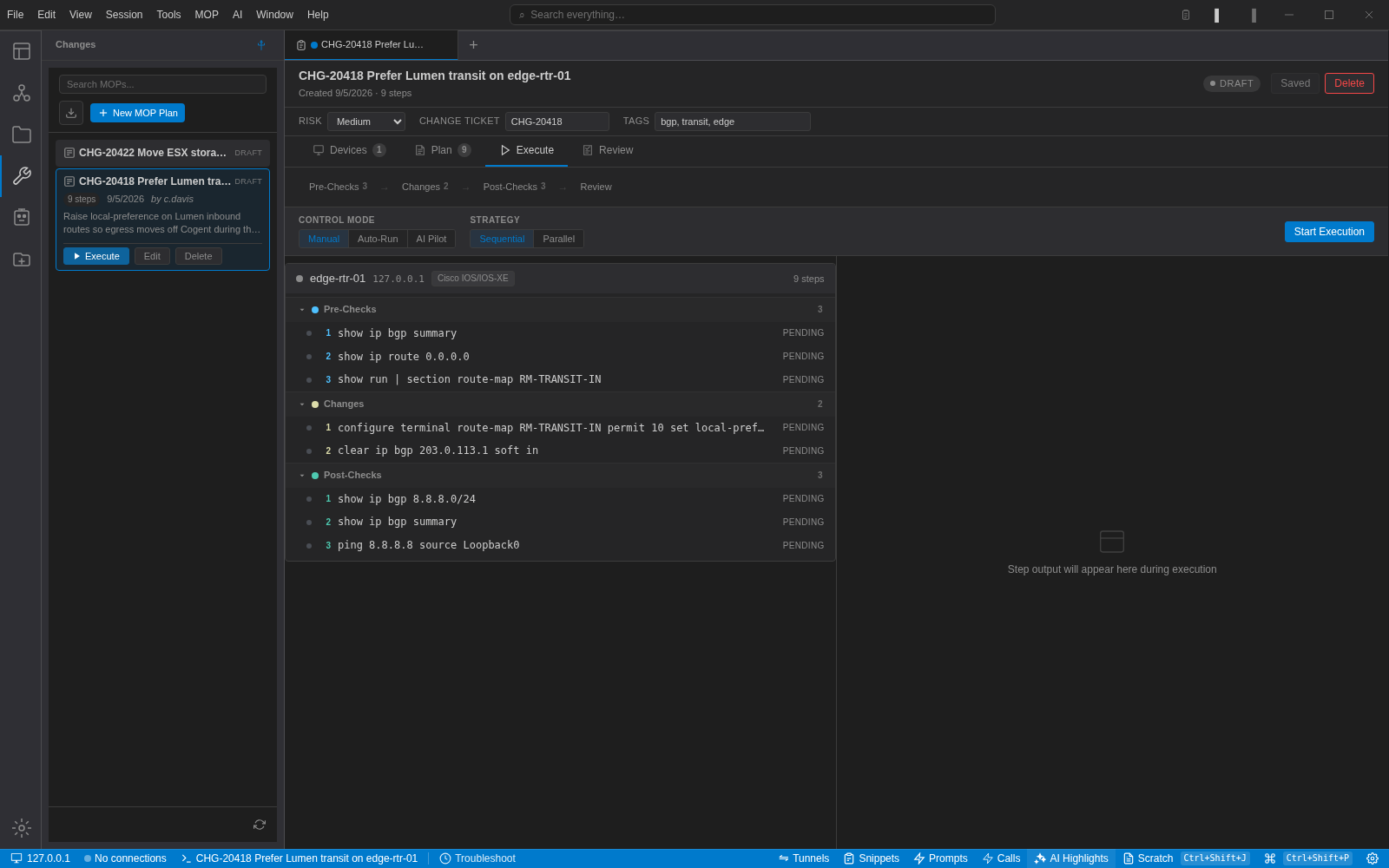
Here is a change we ran in the lab recently: prefer one transit provider over another during the other one's maintenance window. It is small, it is common, and it is exactly the kind of change that gets pasted straight into a router because "it is just a route-map".
The plan has nine steps. Three pre-checks, two changes, three post-checks, one rollback. Each step is a command, a one-line description, and the output we expect to see.
Pre-checks that can say no
show ip bgp summary with expected output Established. If a peer is already down, the change is not the right thing to be doing right now, and the plan halts before anything is modified.
show ip route 0.0.0.0 expecting 203.0.113.1. We are about to prefer this next hop; confirm it is there.
show run | section route-map RM-TRANSIT-IN with no expected output. This one exists to capture the current policy into the execution record, so the rollback has something to be compared against.
Changes
Enter the route-map, set local-preference 150, end. Then clear ip bgp 203.0.113.1 soft in. Soft, not hard. The description says why, so whoever runs this at two in the morning does not "fix" it to a hard clear.
Post-checks that mean something
show ip bgp 8.8.8.0/24 expecting 203.0.113.1 as the best path. show ip bgp summary expecting Established again, because the soft clear should not have dropped anything. ping 8.8.8.8 source Loopback0 expecting Success rate is 100 percent. Reachability is the check that matters; the others explain it if it fails.
Rollback written first
Remove the set local-preference, soft clear again. It is in the plan before the plan is approved, and it is one click during execution.
What the tooling adds
Typed steps mean the executor knows which phase it is in. Pre-checks run, and if any expected output does not match, execution pauses with the mismatch highlighted. You choose whether to continue, retry, skip or roll back. Control mode can be manual (you run each step), auto-run (it proceeds while checks pass) or AI pilot (the assistant reads each output and, depending on the trust level you pick, comments on it, proposes the next step for you to approve, or runs the phases itself and stops on any failure). Strategy can be sequential or parallel across devices.
Steps do not have to be CLI commands. A pre-check can be a saved script or a REST quick action against your monitoring system: "is anything alarming on this device right now?" is a fine pre-check and it is not a show command.
Plans export as .mop.json, so they can live in a repository and be reviewed like code. Import brings them back with their variables.
The habit that matters most
Write the expected output. A step with a command and no expectation is a script. A step with an expectation is a check. The whole value of the format is that the executor can tell the difference and stop.