
Variables
EnterpriseHow NetStacks detects template variables, how values are typed (strings, numbers, lists), and where values come from when you deploy.
Overview
A variable is any name a template reads but does not define itself, for example vlan_id in switchport access vlan {{ vlan_id }}. You do not declare variables anywhere: NetStacks reads them out of the template source. You supply values when you preview the template and when you deploy it through a stack.
Automatic Detection
When you save a template, the Controller parses the source and records every undeclared variable. They appear as chips under Template Source and as fields under Test Variables.
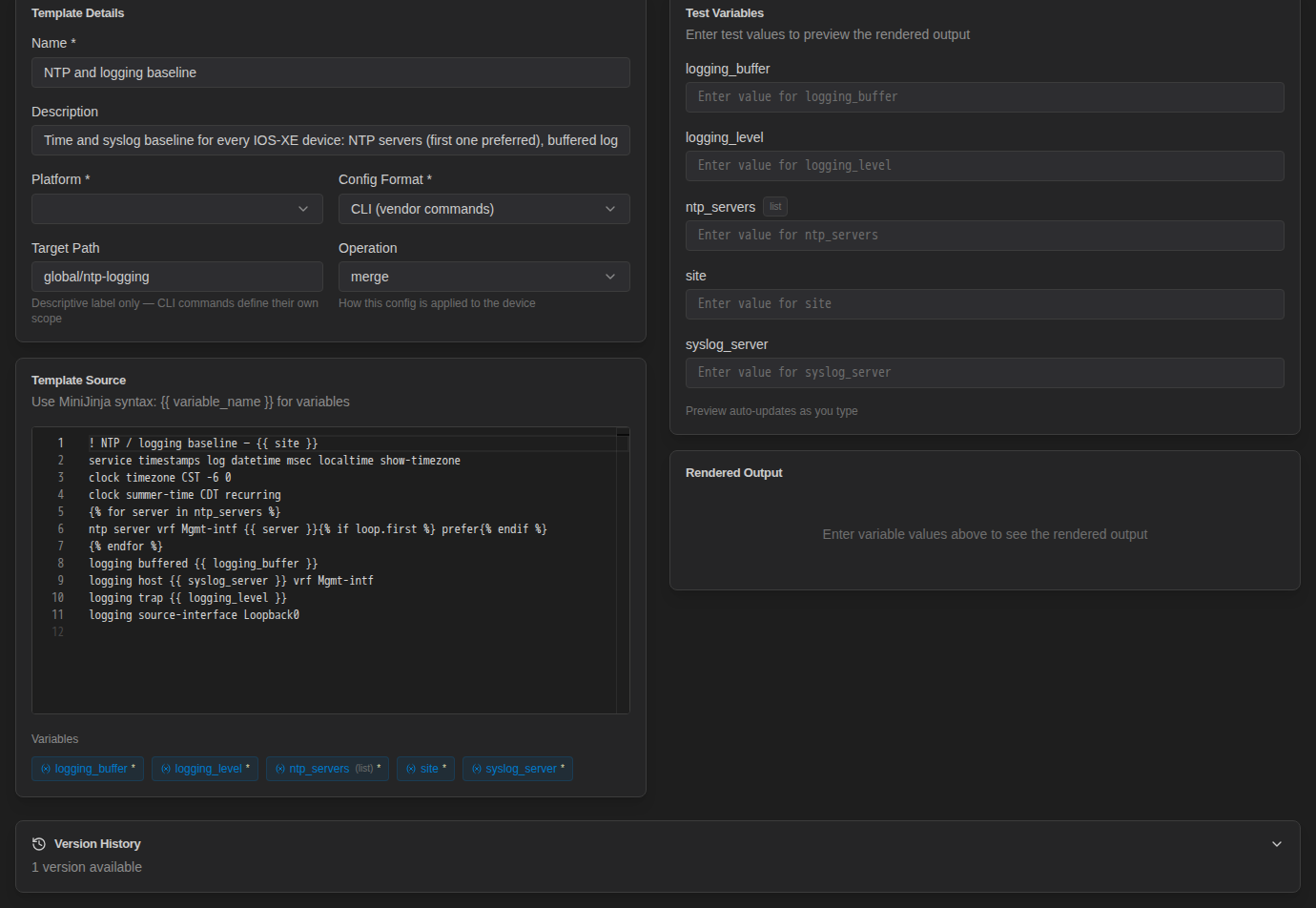
- Names you create inside the template (loop variables such as
serverin{% for server in ntp_servers %}, or{% set %}names) are not variables. Onlyntp_serversis. - For an object such as
{{ uplink.name }}, only the top-level name (uplink) is listed. - Every detected variable is marked required (the
*on the chip).
NetStacks also guesses a type for each variable, shown as a small tag:
| Tag | When it is used |
|---|---|
| list | The variable is looped over: {% for x in VARIABLE %} |
| number | The variable appears unquoted after a colon, as in a JSON template: "mtu": {{ mtu }} |
| (no tag) | Everything else is treated as a string. |
On the edit page, Test Variables lists the variables from the last saved version. After you add a new {{ variable }} to the source, click Save to get a field for it.
Entering Values and Types
Every value field (in Test Variables, and in an instance's Shared Variables and Per-Device Variables) is a text box. Before rendering, NetStacks converts text that looks like another type:
| You type | The template receives |
|---|---|
["10.90.0.5", "10.90.0.4"] | A list of two strings |
{"name": "Gi1/0/1", "vlan": 10} | An object with name and vlan |
true / false | A boolean |
120, 1.5 | A number |
| Anything else | The text as a string |
Lists and Objects
Enter list and object values as valid JSON, with double quotes around strings. A comma-separated value such as 10.90.0.5,10.90.0.4 stays a single string, and a for loop over a string walks through it one character at a time.
{# allowed_pollers = ["10.90.0.6", "10.90.0.7"] #}
{% for poller in allowed_pollers %}
access-list 60 permit host {{ poller }}
{% endfor %}Before you deploy, check that every list variable in an instance still holds a JSON array (square brackets and quotes), and use Render Preview to confirm the loop output looks right.
Numbers and Booleans
Conversion happens for every value, whatever the variable's type tag. Two consequences to keep in mind:
- Values made only of digits lose leading zeros.
0100becomes100. A decimal such as1.10becomes1.1. - The text
falsebecomes a boolean, so{% if enabled %}behaves as you would expect.
If a value must keep its exact text (for example an identifier with leading zeros), add a non-numeric character in the template instead, such as a prefix written in the source (ID-{{ site_number }}), or format it with the format filter: {{ "%04d" | format(site_number) }}.
Where Values Come From at Deploy Time
Test values typed in the template editor are only for previewing; they are not saved. Real values are set on a stack and its instances:
- Scope (on the stack). In the stack editor's Detected Variables card, each variable is marked Shared or Per Device.
- Shared Variables (on the instance). One value used for every device the service targets, for example
ntp_servers. - Per-Device Variables (on the instance). A value for each device, for example
interfaceandport_description. - Resolve from API. A stack variable can be configured to fetch its value from an API Resource such as NetBox. Click Resolve from API in the instance to fill it in.
When the same variable has more than one value, a per-device value wins over a shared value, which wins over any default stored on the stack's service. Details and screenshots are in Shared & Per-Device Variables.
Device Data
Templates do not get device facts automatically. There is no built-in device or hostname variable at render time. To use device-specific data:
- Make the variable Per Device and enter the value per device, or
- Use Configure API on the stack variable. The API Path can include device fields, for example
/api/dcim/devices/?name={{ device.name }}. The fields available there aredevice.name,device.host(alsodevice.hostname),device.site,device.platform,device.manufacturer,device.model,device.device_type,device.serial_number,device.asset_tag, anddevice.id.
Tips
- Use descriptive, lowercase names with underscores (
syslog_server, nots1). The name is the only label people see in the instance form. - Variables with the same name in different templates of one stack share one scope setting. Use that on purpose (one
sitefor every service) or pick distinct names. - Give optional values a fallback with
default:{{ logging_level | default("informational") }}.