
FAQ
Answers to common questions about NetStacks Terminal and the NetStacks Controller: platforms, modes, data storage, privacy, updates, credentials, protocols, AI providers, backups and licensing.
General
What is the difference between NetStacks Terminal and the Controller?
NetStacks Terminal is the desktop app for network engineers: SSH and Telnet terminal, AI assistant, topology, SNMP lookups, MOPs, documents and more. On its own it runs in standalone (Personal) mode, with everything stored on your computer.
NetStacks Controller is a server your team hosts. The Terminal can connect to it (enterprise mode) for a shared device inventory, central credential vault, users and roles, config backups and automation, AI agents and audit logs. The Controller also serves a browser version of the Terminal at /terminal/.
Do I need a Controller?
No. The Terminal works on its own in standalone mode, with no account and no server.
How do I switch between standalone and a Controller?
In standalone mode use Sign in to a Controller instead on the unlock screen, or Settings → Enterprise, enter the Controller URL and click Save & Restart. To go back, use Use standalone mode instead on the sign-in screen, or clear the URL in Settings → Enterprise. The app restarts each time. Your standalone data stays on your computer while you use a Controller.
How much does it cost?
For Controller licensing and pricing, see NetStacks Enterprise or contact us.
Installing and Updating
Which platforms are supported?
| Platform | Download |
|---|---|
| macOS 10.15 or later | Separate DMGs for Apple silicon (arm64) and Intel (x64) |
| Windows 10 / 11 | x64 installer (.exe), installs for the current user without admin rights |
| Linux | x86_64 AppImage and .deb |
Get them from the Download page. The Controller runs as Docker containers on an x86-64 Linux server.
How do I update the Terminal?
The desktop app checks for updates a few seconds after it starts. When one is available, an Update Available banner offers Install Now or Later. After installing, the app restarts on the new version. There is no separate "check for updates" menu item; restart the app to check again. The web terminal is updated together with the Controller.
How do I update the Controller?
Run ./upgrade.sh in the deployment directory, or docker compose pull && docker compose up -d. See Upgrades and Rollback.
Data, Privacy and Backups
Where is my data stored?
In standalone mode, in one SQLite database on your computer (for example ~/Library/Application Support/netstacks/netstacks.db on macOS). Full paths for each OS are in Logs & Diagnostic Information. In enterprise mode, devices, credentials and shared content are stored on the Controller.
Does NetStacks send my data to NetStacks?
In standalone mode, AI requests go from your computer straight to the AI provider you configured, after secrets are removed. They do not pass through NetStacks servers. The app does contact releases.netstacks.net at start-up to check for updates, and downloads the public IEEE MAC vendor list for hover lookups.
How are my credentials protected?
In standalone mode, passwords, key passphrases, API keys and tokens are encrypted in the local vault with AES-256-GCM, using a key derived from your master password with Argon2id. SSH private keys stay in their files; only the path and passphrase are stored. In enterprise mode the Controller keeps credentials in its own vault and never sends them to the Terminal.
How do I back up my standalone data?
Use Settings → Integrations → Backup & Seed. A Full backup includes your vault (still encrypted). You can also copy the database file while the app is closed.
I forgot my master password. Can it be recovered?
No. You can reset the vault, which deletes the stored secrets but keeps sessions, profiles, topology, documents and settings. See Forgot your master password.
Connections and Credentials
Which protocols are supported?
SSH and Telnet, plus a local shell on your computer in standalone mode. For out-of-band access, a session can open a console through a terminal server (such as Opengear, Avocent, Lantronix or a Cisco async router) over SSH or Telnet. Direct serial/COM ports, RDP and VNC are not supported.
Can I use my existing SSH keys or ssh-agent?
You can use key files: set Public Key in a Credential Profile and give the Key File Path (for example ~/.ssh/id_ed25519) and passphrase. NetStacks does not use a running ssh-agent.
Can I import sessions from other tools?
In standalone mode you can import CSV or NetStacks JSON from the Sessions toolbar, SecureCRT XML exports and NetBox devices from Settings → Integrations.
Can I chain jump hosts?
No. A session can go through one jump host. Jump hosts are a standalone feature; with a Controller, the Controller connects to devices itself.
AI
Which AI providers can I use?
In standalone mode: Anthropic, OpenAI, OpenRouter, Ollama, LiteLLM, and Custom (any OpenAI-compatible API, Google Gemini / Vertex AI, or Anthropic on Vertex AI). You bring your own API key and choose the model. With a Controller, your administrator configures the providers.
Can I run AI fully locally?
Yes. Point NetStacks at Ollama, a LiteLLM proxy, or another self-hosted OpenAI-compatible endpoint.
Do I have to use AI?
No. The terminal, sessions, topology and other features work without an AI provider. Background AI features stay silent until one is configured.
Can the AI change my device configuration?
Not by default. The AI can only run read-only commands until you turn on AI Configuration Mode, which needs your master password and switches itself off after 5 minutes. With a Controller, an admin must allow it. See The AI Will Not Run a Command.
Controller
Is the Controller cloud-hosted?
No. You run it on your own server with Docker Compose. It needs outbound internet access to pull images and to activate and re-validate its license.
Can I use the Terminal in a browser?
Yes, with a Controller. Open https://<controller>:3000/terminal/ or click Terminal in the admin console header. The browser version has the same enterprise features as the desktop app in enterprise mode, but no local shell on your computer (a Local Shell tab opens a container on the Controller instead).
Why does my browser warn about the certificate?
The Controller uses a self-signed certificate authority by default. Install its CA certificate once. See Controller Certificate Errors.
How are license seats counted?
One seat per user signed in to the Terminal (desktop or web), counted while they have been active in the last hour. Admin console sign-ins do not use seats.
What Is the Troubleshoot Button?
Troubleshoot in the status bar (or Cmd/Ctrl+Shift+K) is not a diagnostic tool for NetStacks itself. It records a troubleshooting session on your network: pick the terminals to capture, optionally include your AI chat, and click Start Recording. When you end it, NetStacks writes a summary document (findings, actions taken, resolution) into Documents.
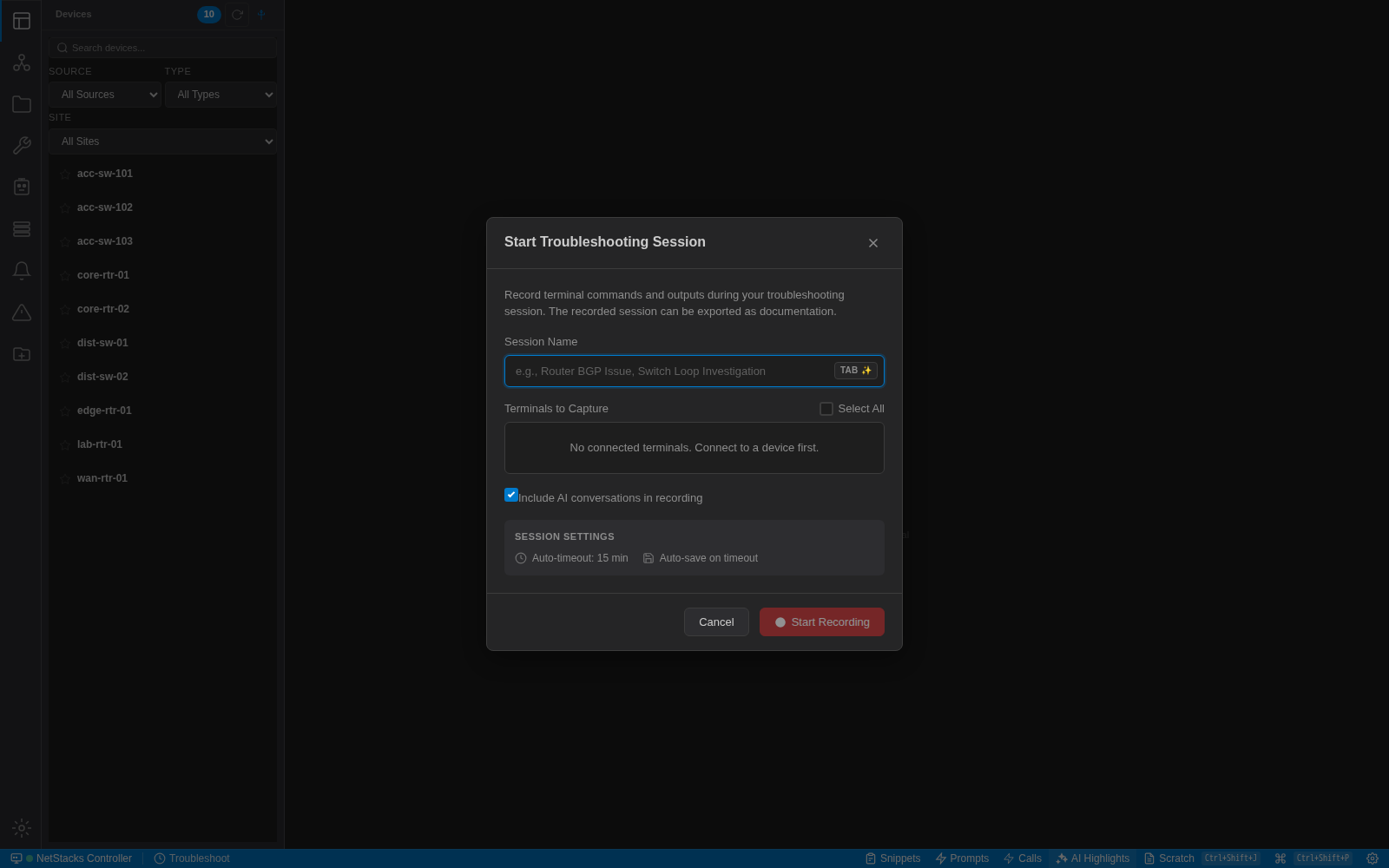
The session stops automatically after 15 minutes without activity by default. Connect to at least one device first; otherwise the dialog shows No connected terminals. Connect to a device first.
Getting Help
- Connection Issues, Sign-In & Vault Problems, AI Assistant Problems and the Controller pages in this section cover the common errors.
- Asking for Help lists what to include in a report.
- The Support page lists ways to reach us, or email [email protected].