
Privacy & Data Sanitization
What NetStacks sends to your AI provider, where it goes, and how credentials and other sensitive values are redacted before they leave.
Overview
Every AI request NetStacks makes — chat messages, terminal scrollback, tool results, system instructions, troubleshooting timelines — passes through a sanitizer first. Known credential formats are always replaced with redaction markers, and you can optionally redact IP addresses, MAC addresses, hostnames and usernames, or add your own patterns.
In the standalone Terminal you configure this in Settings → AI → AI Data Security. When connected to a NetStacks Controller, the settings are organization-wide and enforced on the Controller.
Where Your Data Goes
- Standalone Terminal: AI requests go from your computer directly to the provider URL you configured (Anthropic, OpenAI, OpenRouter, Ollama, LiteLLM or a custom endpoint), after sanitization. Nothing on the AI path goes through NetStacks servers. With Ollama, LiteLLM or a custom self-hosted endpoint, the data never has to leave your network.
- Connected to a Controller (desktop or web terminal): AI requests go to your Controller, which applies your organization's sanitization settings and then calls the provider your administrator configured.
What is included depends on your context settings (scrollback lines, memories, device notes and so on) — see Context & Memory. The Terminal contains no analytics or telemetry SDK; token usage is counted locally.
Mandatory Patterns
Nineteen credential patterns are always active and cannot be turned off. Expand Mandatory Patterns (19 always active) to see them:
- Cisco enable secret / password
- Cisco password 7
- Cisco password 0
- SNMP community strings
- SNMPv3 auth/priv keys
- TACACS keys
- RADIUS keys
- Juniper secrets ($9$)
- Juniper encrypted passwords
- Arista secrets
- Palo Alto passwords
- Palo Alto keys
- Private key blocks
- Certificate blocks
- Generic API keys / tokens
- AWS access keys
- AWS secret keys
- Generic passwords
- Generic secrets / shared keys
Matched values are replaced with markers such as [REDACTED], [PRIVATE-KEY-REDACTED] or [AWS-KEY-REDACTED], so the AI still sees that a secret was there without seeing the secret itself.
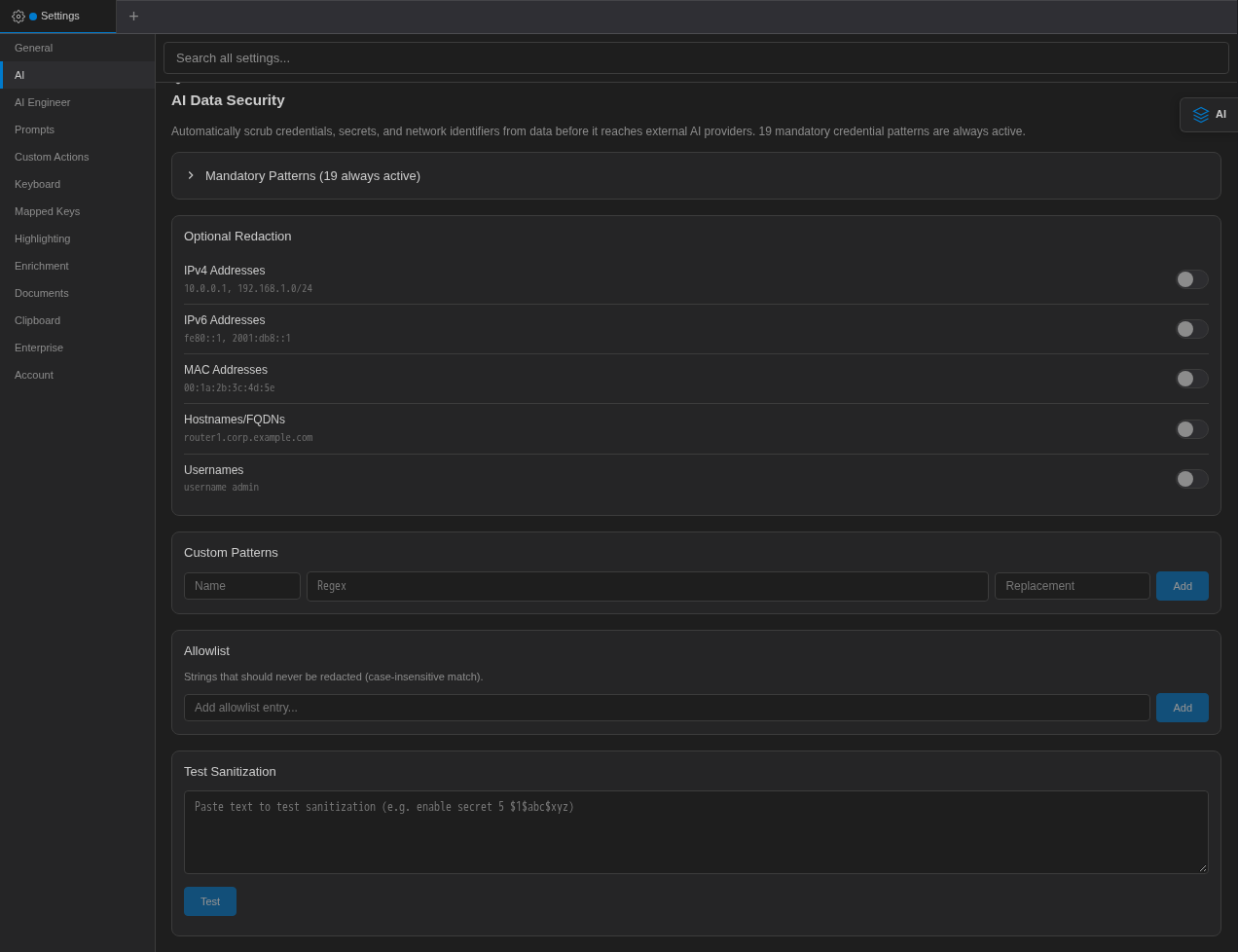
The AI Data Security section in Terminal Settings → AI.
Optional Redaction
Under Optional Redaction, turn on any of these (all are off by default):
| Option | Example | Replaced with |
|---|---|---|
| IPv4 Addresses | 10.0.0.1, 192.168.1.0/24 | [IP-REDACTED] |
| IPv6 Addresses | fe80::1, 2001:db8::1 | [IPv6-REDACTED] |
| MAC Addresses | 00:1a:2b:3c:4d:5e | [MAC-REDACTED] |
| Hostnames/FQDNs | router1.corp.example.com | [HOST-REDACTED] |
| Usernames | username admin | a redaction marker |
Custom Patterns & Allowlist
Custom Patterns let you redact organization-specific values such as ticket IDs or internal account numbers. Enter a Name, a Regex and the Replacement text, then click Add.
The Allowlist lists "Strings that should never be redacted (case-insensitive match)" — for example a documentation address range or a well-known public hostname that the optional patterns would otherwise hide.
Patterns are applied in order: mandatory, then optional, then custom.
Test Sanitization
Paste sample text into Test Sanitization (for example enable secret 5 $1$abc$xyz) and click Test. NetStacks shows the redacted result, the number of redactions and which patterns matched. Use this to check a custom regex before relying on it.
Organization Settings on the Controller Enterprise
On a NetStacks Controller, sanitization settings belong to the organization and apply to every AI request made through the Controller — Terminal AI, admin AI Chat, agents and knowledge base indexing. If the sanitizer cannot be loaded, the request is refused rather than sent unredacted.
Administrators edit them in the admin console under Settings → AI → AI Data Security ("Configure automatic redaction of credentials and sensitive data sent to LLMs"):
- Mandatory Patterns — the 19 always-on credential patterns.
- Optional PII Patterns — Redact IP Addresses, IPv6 Addresses, MAC Addresses, Hostnames and Usernames.
- Custom Patterns — Pattern Name, Regex Pattern and Replacement Text, then Add Pattern. Invalid regular expressions are rejected when you save.
- Allowlist — exact strings that are never redacted.
- Test Sanitization — preview the result without logging it.
- Audit Summary — total redactions, last 24 hours and a breakdown by context. The audit trail stores counts and pattern names only, never the original values.
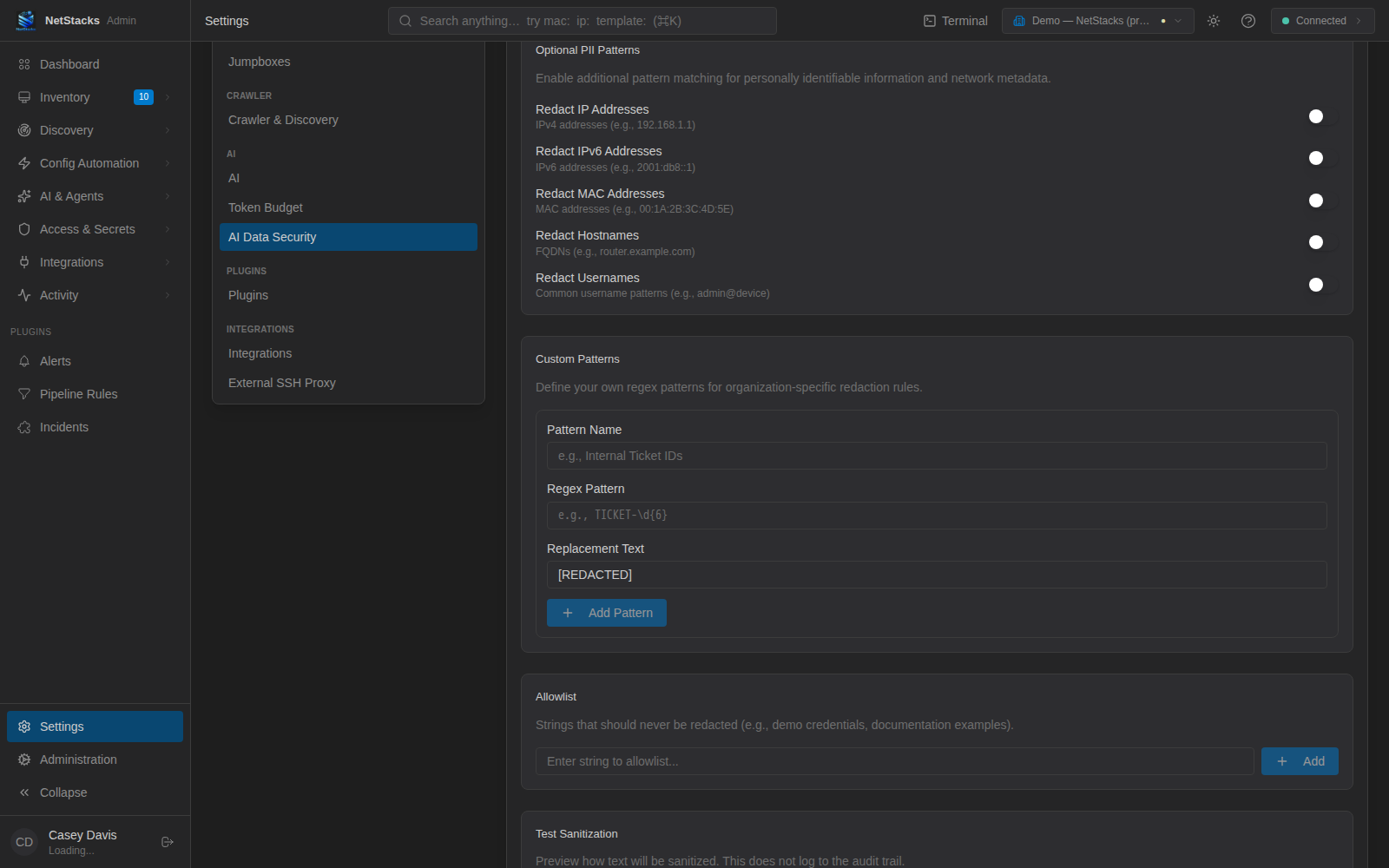
The Controller's AI Data Security settings. Administrators can also edit the same organization settings from the AI Data Security section of the Terminal's Settings → AI.
Secure Notes
Documents in the Secure Notes category are kept away from AI: the AI Enhance button is not offered for them, the AI is told never to quote them, and on a Controller they are encrypted at rest and never indexed into the knowledge base.